
2026 September
Safeguard: Warning Before Losing Unsaved Change
IMPROVEMENT
When you're making changes on the Safeguard page — like destination restrictions, IP allow-listing, or rate limits — and try to leave before saving, you'll now see a confirmation prompt. This protects your configuration work from being accidentally lost, whether you refresh the page, close the tab, use your browser's back/forward buttons, or navigate elsewhere in the app.
Improvements
-
Unsaved changes warning — Safeguard now asks you to confirm before you leave the page if you have unsaved changes, so your edits stay safe from accidental navigation.
2026 August
Safeguard: Easier IP Address Management
CHANNELS FEATURE RELEASE
Managing IP address restrictions in Safeguard is now faster and more flexible.
What's new
-
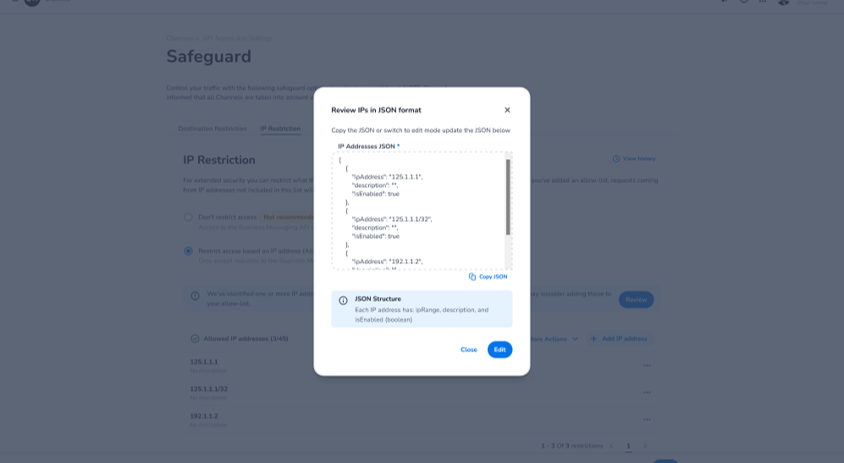
Review & edit IPs as JSON — Use the new "Review IPs in JSON format" button to view all configured IPs at once and edit them directly in JSON, with validation and a warning before saving (this replaces all existing entries).
-
IPv6 support — IP address restrictions now accept IPv6 addresses alongside IPv4.
-
Higher limit — The maximum number of IP addresses/ranges you can configure has increased from 45 to 250.
Safeguard: Multiple & Country-Level Rate Limits
CHANNELS FEATURE RELEASE
Safeguard's rate limiting has been extended to give you more granular control over how your traffic is protected.
What's new
-
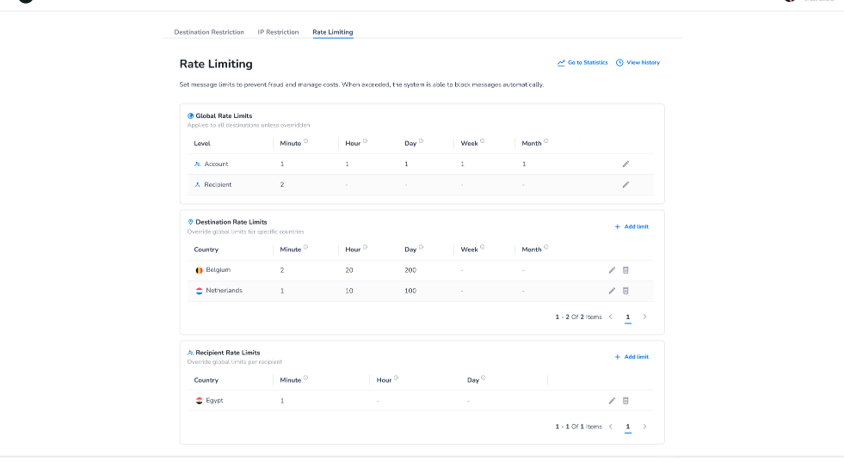
Multiple rate limits per time frame — Configure separate rate limits per minute, hour, day, week, and month, at both the account level and the recipient level.
-
Country-level rate limits — Set destination-specific rate limits per country; a country-specific rule overrides the global rate limit when configured.
-
Rate limit overview — Dedicated, paginated overviews show combined counts for global limits and a breakdown of destination-specific limits by country.
-
Time frame reference — A new info icon clarifies exactly what each time frame covers (e.g. a "day" runs 00:00:00–23:59:59).
Safeguard: Now on Its Own Dedicated Page
CHANNELS IMPROVEMENT
Safeguard moved to its own dedicated page under API access & settings, with separate tabs for destination routing, IP allowlisting, and rate limiting.
Safeguard - Default Destination Management for New Accounts
SECURITY IMPROVEMENT
Every new Messaging Platform account now gets an extra layer of protection from the moment it's created. Instead of only applying a blocklist of high-risk countries, new accounts are automatically restricted to send traffic exclusively to the country set in your CRM record. This closes a security gap that previously left brand-new accounts open to send messages worldwide before any Safeguard configuration was in place — helping protect you against Artificially Inflated Traffic (AIT) from day one.
What's new
-
Automatic country-based Destination Management — When a new account is created, outbound messaging traffic is automatically restricted to the country registered in your CRM through an allow-list, replacing the previous default of a high-risk country blocklist only.
You can review or adjust this default anytime in Channels under API Access and Settings → Safeguard → Traffic destination restrictions.
2026 April
Safeguard – Enable IP Address Restrictions
Security recommendation
We strongly recommend that all Messaging Platform customers enable Safeguard IP Address Restrictions to protect against Artificially Inflated Traffic (AIT) and SMS pumping. No technical changes have been made to the platform — this update is focused on helping you get the most out of the security tools already available to you, backed by new documentation in our Knowledge Center.
What's new
-
New Knowledge Center documentation — Detailed guides to help you set up and manage Safeguard IP Address Restrictions are now live.
-
Why it matters — IP Address Restrictions let you control which IP addresses can access your messaging credentials for both Business Messaging API and SMPP connections.
How to enable it
-
Go to cm.com/app/channels
-
Navigate to API Access and Settings → Business Messaging Settings
-
Open the Safeguard tab → IP Address Restrictions
Need help? Contact our Support team or your account manager.
Learn more about AIT fraud | Knowledge Center: IP Address Restrictions
2026 January
Update on TLS 1.3 restriction for Business Messaging
Update
We previously announced that support for TLS 1.2 would end on March 1, 2026. This fixed deadline has been removed. TLS 1.2 remains available for now, but we strongly recommend upgrading to TLS 1.3 as soon as possible. Traffic over TLS 1.2 or unencrypted connections may still be blocked in specific cases for security or compliance reasons.
Safeguard – Descriptive names for IP Address Restrictions
Improvement
You can now add an optional description/name to each allowed IP address or CIDR range, making it easier to recognise why an IP is on your allow-list (e.g. "Office VPN", "Production NAT", "Partner gateway"). This improves maintainability and reduces configuration mistakes.
If you manage IP restrictions via the Messaging Configuration API, the IP restriction data now supports a description field alongside the IP range.
Safeguard – Disable individual IP Address Restrictions
Improvement
You can now disable individual IP addresses or CIDR ranges without deleting them. Disabled IPs stay in your configuration but are no longer enforced — giving you more flexibility during maintenance, testing, or incident handling.
-
Temporarily turn off access for a specific IP/range
-
Quickly roll back by re-enabling the entry
-
Keep your configuration history intact
-
Reduce the risk of re-typing errors when re-adding IPs
2025 November
Restricting to TLS 1.3 for Business Messaging
Action required
CM.com will discontinue support for TLS 1.2 on all connections to our Business Messaging API and SMPP servers. To ensure uninterrupted service, please update your systems to support TLS 1.3.
-
Review your application configuration for the TLS version in use
-
Update your software or libraries — most modern versions already support TLS 1.3
-
Test your integration to confirm TLS 1.3 works end-to-end
2025 June
Safeguard Plus
New feature
We are pleased to announce the launch of Safeguard Plus, a comprehensive solution to protect your messaging traffic from Artificially Inflated Traffic (AIT). It gives businesses the tools to monitor and safeguard messaging operations, ensuring reliable communication and cost management.
-
Advanced Protection — Real-time AIT protection using machine learning, building on the existing Safeguard suite.
-
Dynamic Traffic Profiling — Continuously analyses your messaging patterns to flag irregularities with precision.
-
Flexible Modes — Monitoring Mode for insights without blocking; Blocking Mode to automatically stop suspicious traffic.
2025 February
Safeguard
Improvement
We are updating the Block List for High-Risk Countries to 35 countries via CM.com Safeguard Destination Management, and lowering the minimal rate limit for Safeguard Rate Limiting.
-
Safeguard Destination Management — Effective March 1, 2025, new destinations added to the Block List for all existing accounts. Configure in Channels under API Access and Settings → Business Messaging Settings → Safeguard → Traffic destination restrictions.
-
Safeguard Rate Limiting — You can now set a maximum of 1 message per hour for individual recipients.
2024 August
OTT Bundle Overage
Improvement
Two updates to OTT Bundle management are now live.
-
Improved usage warning emails — Customers and account managers now receive a clearer email at 80% and 100% bundle usage, with guidance on where to view usage and explore upgrade options.
-
Automated overage invoicing — Starting September 1st, overage charges are automatically invoiced at PAYG pricing when the bundle is exceeded.
2024 July
OTT Bundle Overage
New feature
Per August 1, 2024 the OTT Bundle notification service will go live. Customers and account managers will receive an email at 80% and 100% bundle usage, sent in the customer's preferred language.
2024 June
Safeguard
Improvement
Effective July 1, 2024, new destinations will be added to the Block List for all existing accounts via CM.com Safeguard Destination Management.
Find your settings in Channels under API Access and Settings → Business Messaging Settings → Safeguard → Traffic destination restrictions.
2024 April
Safeguard – Rate Limiting & Suggested IP Addresses
New feature
We are introducing Safeguard Rate Limiting and expanding IP Address Restrictions with suggested IP addresses.
-
Recipient Limits — Cap messages sent to any single recipient per hour or day.
-
Account Limits — Cap total messages sent through your account per hour, day, week, or month.
-
Suggested IP Addresses — Known IP addresses from your recent traffic are now surfaced in Channels for easy addition to your restrictions.
Configure in Channels under API Access and Settings → Business Messaging Settings → Safeguard.
Error Codes for OTT Channels
New feature
You can now receive clear, detailed error explanations for your OTT traffic via configured webhooks in Status Reports (DLRs). WhatsApp errors are now described using META's own error codes, replacing generic supplier messages. Error details are also visible in the Message Log tool on the CM Platform.
2024 March
Business Messaging API – Product Token in header
New feature
You can now provide your product token via the request header as an alternative to embedding it in the request body. This separates your credentials from request content and enhances flexibility. Currently available for the Europe region via gw.messaging.cm.com.
Safeguard – IP Address Restrictions
New feature
IP Address Restrictions provide a defense layer by permitting access exclusively to registered IP addresses or ranges. Even if your product token is compromised, IP restrictions act as a shield against unauthorized access.
Configure in Channels under API Access and Settings → Business Messaging Settings → Safeguard → IP Address Restrictions.
-
Only IPv4 addresses supported
-
CIDR prefix ranges supported
-
Two options: allow all, or maintain an explicit allowlist
Blocked HTTP connections receive Code 101: No account found for the given credentials. Blocked SMPP connections receive Bind failed.